9 Homework
9.1 General Homework Directions
Unless noted otherwise, the following directions apply to all homework assignments.
- Content
Homework will vary in structure, including warm-up questions that assess basic understanding of course concepts, applied exercises that extend course concepts to novel settings, and open-ended questions that challenge you to conduct analyses without the crutch of leading prompts. The last of these is challenging by design - we want to encourage you to practice taking academic risks, being comfortable making mistakes, and discovering depth in the course material.
- Structure
- With some exceptions (eg: Homework 1), you will be required to type up your work using R markdown. Why? Markdown is a great tool for constructing reproducible reports that easily incorporate RStudio code/output.
- Keep it neat. Your work should (1) have your name on it; (2) present exercises in order; (3) follow the provided template; (4) include only relevant RStudio code/output - no errors; and (5) be submitted on Moodle in advance of the deadline.
- Be sure to submit the html file, not Rmd.
- With some exceptions (eg: Homework 1), you will be required to type up your work using R markdown. Why? Markdown is a great tool for constructing reproducible reports that easily incorporate RStudio code/output.
- Timing
No late homework will be accepted. Why? Not only is it extremely important to practice time management, the course rapidly builds upon itself - if you get behind, it will be difficult to catch up. That said, we also acknowledge that stress levels / work loads vary throughout the semester and that you have to adjust your priorities accordingly. With this in mind, the lowest homework score will be dropped.
- Grading
- Homework will be graded on completion and correctness. You may receive partial credit.
- Show work! 50% of points will be deducted on exercises that aren’t supported by work or RStudio code (as relevant).
- Homework will be graded on completion and correctness. You may receive partial credit.
Miscellaneous
Seek help early and often. Though meeting in person is best, you can also post questions on the Piazza forum.
All questions about the grading of homework, quizzes, etc must be discussed with the instructors within one week of receiving feedback on the assignment in question.
You’re responsible for understanding & following the college’s academic integrity policies. If you have any questions, discuss them with your instructors.
9.2 Homework 1
Directions:
- Review the “General Homework Directions” at the top of the Homework chapter in the course manual.
- For Homework 1, ignore the directions regarding R Markdown. Instead, you can copy and paste your work into a Word (or other word processing) document.
Exercises
As you might guess from the name, “Data Science” requires data. Working with modern (large, messy) data sets requires statistical software. We’ll exclusively use RStudio. Why?
- it’s free
- it’s open source (the code is free & anybody can contribute to it)
- it has a huge online community (which is helpful for when you get stuck)
- it’s one of the industry standards
- it can be used to create reproducible and lovely documents (In fact, this entire course manual that you’re currently reading was constructed entirely within RStudio!)
The goal of this homework is to get up and running with RStudio.
Downloading RStudio
To get started, take the following two steps in the given order. Even if you already have R/RStudio, make sure to update to the most recent versions. Further, if you get stuck, visit the ITS help desk.
STEP 1: Download & install the R statistical software at https://mirror.las.iastate.edu/CRAN/
STEP 2: Download & install the FREE version of RStudio at https://www.rstudio.com/products/rstudio/download/What’s the difference between R and RStudio? Mainly, RStudio requires R – thus it does everything R does and more. We will be using RStudio exclusively.
- A quick tour of RStudio
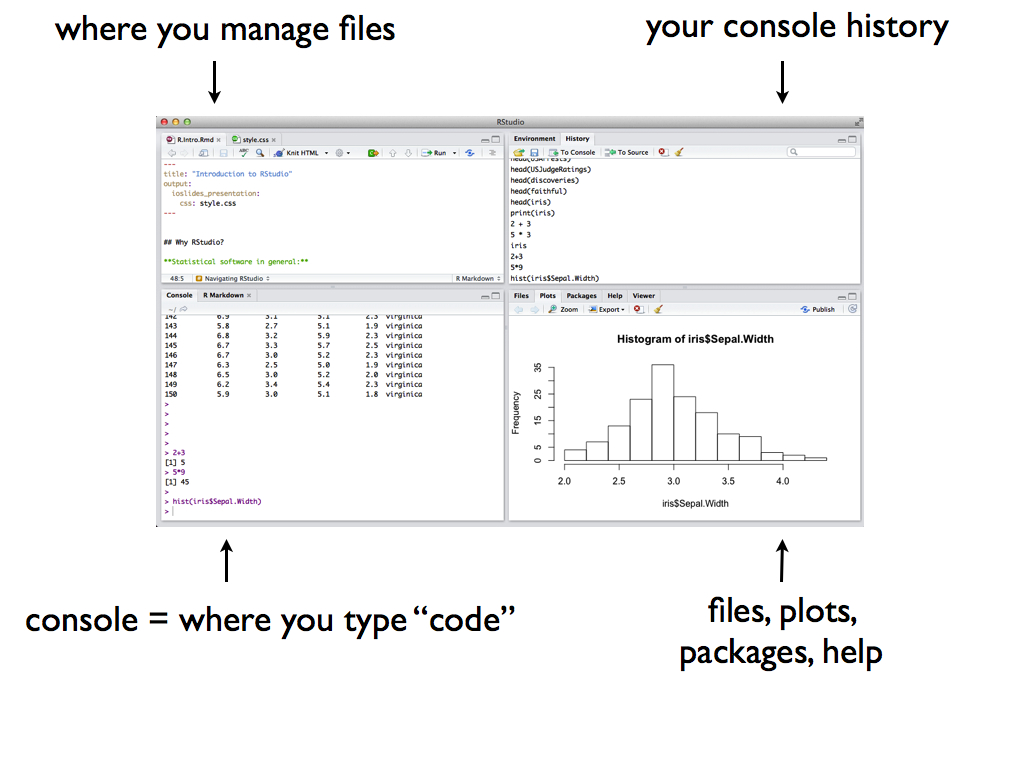
Open RStudio! You should see four panes, each serving a different purpose:

- Perform a simple calculation: calculate
90/3.
- Remember that RStudio has built-in functions to which we supply the necessary arguments:
function(arguments). Use a built-in function to calculate the square root of 25.
- Use a built-in function to repeat the number “5” 8 times.
- Perform a simple calculation: calculate
- Install packages
Install the following RStudio packages that contain specialized functions written by other RStudio users:tidyverse
ggplot2
fivethirtyeight
- Find help
You will certainly make many, many mistakes. Even the best programmers make mistakes every day - and learn something new in the process. The following will save you some time and frustration:- Spelling & capitalization matter.
thisandThiSare different.
- Use the up arrow to access previous lines without re-typing.
- Type
?repto get help for therepfunction (for example). The help files that pop up usually have useful examples at the very bottom.
- Find help online! There’s a massive RStudio community at http://stackoverflow.com/ If you have a question, somebody’s probably already written about it.
seqfunction to create the vector(0, 3, 6, 9, 12). - Spelling & capitalization matter.
9.3 Homework 2
Directions:
Review the “General Homework Directions” at the top of the Homework chapter in the course manual. Unlike Homework 1, you’re expected to use R Markdown for Homework 2.
Goals
- Apply your data visualization skills to new data.
- Practice R Markdown.
Exercises
Exercise 10 of Section 2.4 (Univariate Visualizations)
Exercise 11 of Section 2.4 (Univariate Visualizations)
Exercise 12 of Section 2.4 (Univariate Visualizations)
Exercise 13 of Section 2.4 (Univariate Visualizations)
Exercise 14 of Section 2.4 (Univariate Visualizations)
Exercise 13 of Section 2.5 (Bivariate Visualizations)
Exercise 14 of Section 2.5 (Bivariate Visualizations)
Exercise 15 of Section 2.5 (Bivariate Visualizations)
Exercise 16 of Section 2.5 (Bivariate Visualizations)
Exercise 17 of Section 2.5 (Bivariate Visualizations)
Exercise 18 of Section 2.5 (Bivariate Visualizations)
9.4 Homework 3
Directions:
Review the “General Homework Directions” at the top of the Homework chapter in the course manual.
Goals
- Apply your data visualization skills to new data (with fewer prompts than before!).
- Practice R Markdown.
Exercises
Exercise 6 of Section 2.6 (Beyond Bivariate Relationships)
Exercise 7 of Section 2.6 (Beyond Bivariate Relationships)
Exercise 8 of Section 2.6 (Beyond Bivariate Relationships)
Exercise 9 of Section 2.6 (Beyond Bivariate Relationships)
Exercise 3 of Section 2.7 (Visualization Wrap-Up)
Exercise 4 of Section 2.7 (Visualization Wrap-Up)
Exercise 5 of Section 2.7 (Visualization Wrap-Up)
9.5 Homework 4
Directions:
Review the “General Homework Directions” at the top of the Homework chapter in the course manual.
Goals
- Learn to use the six data verbs to manipulate datasets.
- Practice spread and gather
Exercises
Exercise 4 of Section 2.8 (Data Wrangling: Introduction)
Exercise 5 of Section 2.8 (Data Wrangling: Introduction)
Exercise 6 of Section 2.8 (Data Wrangling: Introduction)
Exercise 7 of Section 2.8 (Data Wrangling: Introduction)
Exercise 8 of Section 2.8 (Data Wrangling: Introduction)
Exercise 3 of Section 2.9 (Data Wrangling: Spread, Gather, Wide & Narrow)
9.6 Homework 5
Directions:
Review the “General Homework Directions” at the top of the Homework chapter in the course manual.
Goals
- Learn to use the six data verbs to manipulate datasets.
- Practice spread and gather
Exercises
Exercise 3 of Section 4.3 (Data Wrangling: Joins)
Exercise 4 of Section 4.3 (Data Wrangling: Joins)
Exercise 5 of Section 4.3 (Data Wrangling: Joins)
Exercise 6 of Section 4.3 (Data Wrangling: Joins)
9.7 Homework 6
Directions:
Review the “General Homework Directions” at the top of the Homework chapter in the course manual.
Goals
Explore how to implement & evaluate tools for classification.
Exercises
Exercise 7 of Section 6.1 (Classification Trees)
Exercise 8 of Section 6.1 (Classification Trees)
Exercise 9 of Section 6.1 (Classification Trees)
Exercise 10 of Section 6.1 (Classification Trees)
Exercise 11 of Section 6.1 (Classification Trees)
Exercise 1 of Section 6.2 (Random Forests)
Exercise 2 of Section 6.2 (Random Forests)
Exercise 3 of Section 6.2 (Random Forests)
Exercise 4 of Section 6.2 (Random Forests)
Exercise 5 of Section 6.2 (Random Forests)
9.8 Homework 7
Directions:
Review the “General Homework Directions” at the top of the Homework chapter in the course manual.
Goals
In this “mini-project”, you will bring it all together: visualization, wrangling, and classification/prediction.
Exercises
Complete Section 6.3 (Regression Trees).
9.9 Homework 8
Directions:
Review the “General Homework Directions” at the top of the Homework chapter in the course manual.
Goals
In this homework assignment you will gain expertise in acquiring data using SQL and also begin brainstorming about your final project.
Exercises
Complete the following exercises. For the SQL questions, please provide the SQL code along with a screenshot or table showing the first few rows of your result set. You can include SQL blocks that have nice syntax highlighting by include a special sql chunk witheval=FALSE:
```{sql eval=FALSE}
SELECT * FROM posts
```
Complete Final Project assignment FP1. Upload this to the FP1 assignment on Moodle separately by Monday at Midnight.
Exercise 7 of Section 7.2 (Introduction to SQL)
Exercise 8 of Section 7.2 (Introduction to SQL)
Exercise 9 of Section 7.2 (Introduction to SQL)
Exercise 10 of Section 7.2 (Introduction to SQL)
Exercise 11 of Section 7.2 (Introduction to SQL)
Exercise 12 of Section 7.2 (Introduction to SQL)
Exercise 13 of Section 7.2 (Introduction to SQL)
Exercise 14 of Section 7.2 (Introduction to SQL)
9.10 Homework 9
Directions:
Review the “General Homework Directions” at the top of the Homework chapter in the course manual.
Goals
In this homework assignment you will gain experience using Web APIs, and begin collecting data that is relevant to your final project.
Exercises
- Exercise 7 of Section 7.3 (Web APIs). Pay careful attention to the homework details! Although this is an individual assignment it requires some minimal coordination with your group. This means you will not be able to start this assignment until your final project groups are assigned (this should happen by Wednesday morning).
9.11 Homework 100
Goals
To orient yourself and take advantage of opportunities provided by Macalester and its unique urban setting.
To develop a pattern of engagement outside the classroom.
Directions
Choose and engage in 5 of the activities listed below. The activities are sorted by category. You must choose 2 “Around Macalester”, 2 “Beyond Macalester”, and are also required to complete the “Office Hours Challenge”. If you have ideas for other activities, chat with the instructors!
- For each activity:
- Take a picture of yourself engaging in the activity (except for office hours);
- Write up a one paragraph summary of your experience. For example: Did you enjoy the activity? What did you learn? Would you recommend this activity to other First Years? Will you continue to pursue similar activities?
- Take a picture of yourself engaging in the activity (except for office hours);
Record your work on all 5 activities in a single document. Submit this document by the deadline.
Though this homework isn’t due until Friday, December 8, don’t leave it to the last minute!
Activities
- Around Macalester (pick 2 from this group)
- “interview” a junior or senior major in one of your fields of interest
- attend a session during the International Roundtable
- sit in on a WMCN radio show
- attend a meeting for a campus organization that piques your interest
- attend a Macalester concert, play, art event, etc
- learn about the namesakes of two buildings on campus
- “interview” a junior or senior major in one of your fields of interest
- Beyond Macalester (pick 2 from this group)
- visit the state capitol building in St Paul!
- learn about our city council, state senate, and U.S. congressional representatives
- try a new cuisine in a neighborhood outside a 2 mile radius of Mac
- attend a community event, concert, play, etc outside Mac
- take the light rail somewhere (to a different neighborhood in Saint Paul, a neighborhood in Minneapolis, the Mall of America)
- check out the Walker Art Center or another museum
- pedal, paddle, or walk around Minneapolis lake(s) (Calhoun, Lake of the Isles, Cedar, Harriet)
- pedal, paddle, or walk along the Mississippi River
- take a nature hike (there are too many options to list here)
- walk around downtown Saint Paul or downtown Minneapolis
- visit the state capitol building in St Paul!
- Office Hours Challenge (required)
Stop by the office hours for at least two of your non-FYC professors.